Last week I publicly reminded myself that the next action list is not a project management system. My list has entropied out of control, and it was because I was not maintaining a hard-nosed distinction between something that was (a) directly and immediately actionable on a current project, and something that was purely (b) informative and great reference material on a project. Glen commented that it is something we all do!
Thus I drew up a mindmap of some ideal characteristics of a system that would help me maintain a clear distinction between these. Key needs:
- The ability to maintain a list of projects along with next actions organized by context.
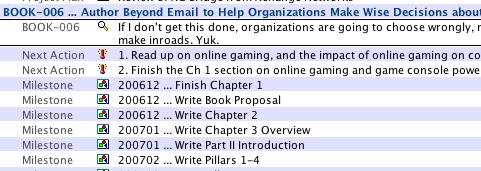
- The ability to create informational-only notes against a project that show up in the context of a project but not on the next action list. Eg, important milestones, project thinking, links to important documents and conversations, and notes.
- The ability to crunch together all milestones for all projects, to see in a single consolidated dashboard by how much I’ve overcommitted myself in a given month!!
- Something which has the possibility of synchronizing with a handheld device.
I looked at a number of systems … such as using OmniOutliner Professional or Midnight Inbox … but neither did exactly what I wanted in the way I wanted it, or I couldn’t figure out how to make it work properly. Or they required dual entry to keep things in alignment. So I got up early on Saturday morning and wrote my own system (as one does!). In the few days that I’ve used it this week, it has been a great contributor to relaxed control over all that I have on my plate.
Here’s what I’ve got:
- A listing of active projects. There’s a project form that includes fields like title, code, client, desired outcome, status, a link to the mindmap for the project, a list of all created next actions, a list of all created milestones, and a list of all other things (project plans, notes, documents, conversations, meeting notes, etc). When I work on a project, I open the project form into its own window, and get to see everything therein without being visually distracted by other guff. Here’s an example from one of my real current projects …
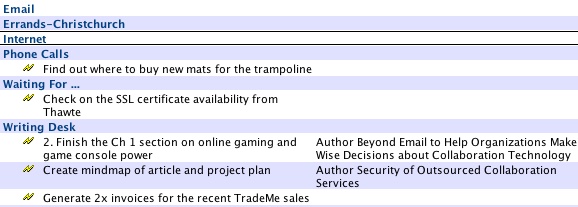
- A very clear distinction between what is immediately and directly actionable, and what is just informational and reference material. The latter is critically important, and very helpful for driving decisions on next actions, but they are not next action materials. There is a specific dashboard just of all next actions across all projects organized by context …
- … and there is a separate dashboard of all milestones organized by month (which helps for current month planning and future month warnings! …
- A form for capturing random ideas quickly. There’s just a title and body field. During my Weekly Review, I can go through each item in turn and either (a) transform it into a new project, (b) transform it to an associated item on a current project, or (c) delete it.
Hence I have formally given up using Microsoft Entourage to do GTD, and am in the process of shifting across to this new system. However, as one of my friends reminded me, the proof is in whether I’m still using it in 2 months. I’ll let you know. But for now … on to my next next action!
Categories: Culture & Competency

