During one of the calls I had with a reviewer of my SharePoint for Business white paper, he asked this question and made the following comment:
How does one articulate the business value of Microsoft Project Server 2007? I have my own ideas, but every time I ask Microsoft about it, they start talking about SharePoint. I haven't yet heard from Microsoft a decent analysis of the value of Project Server in-and-of itself.
I don't know whether Microsoft's failure to explain the value was a purely local phenomena (eg, the people who were asked weren't schooled up in Project), or a more global problem, but from the perspective of this person, they haven't received the answers they wanted.
What's the Business Value of Project Server 2007?
Here's my articulation of what I see as the three main points of value of Project Server:
- Project Plans can be Shared with the Project Team ... In addition to all of the planning, forecasting and resource allocation work that a project manager carries out, there needs to be some way of highlighting aspects of a project to those involved. Historically, the project manager would have to email around a copy, and keep doing so whenever the project plan was updated. With Project Server and Web access, project team members can get a real-time reading on what they are supposed to do, and how the project as a whole is going. According to Pillar 1: Shared Access to Team Data within my 7 Pillars of IT-Enabled Team Productivity model, this is a good thing. It stops people from working on outdated plans, and keeps everyone moving toward the same goal.
- Organization-Wide Templates of Successful Projects ... Learning from past success and failure is a key strategy for future success. In an organizational setting, project managers should engage with team members at the conclusion (or termination) of a project to gauge lessons learnt, and these ideas need to be more widely shared. However, there's a difference between (a) distributing or publishing a list of lessons learnt as a text document, and (b) embedding those ideas in a template for a future project (as tasks-to-be-completed, or as risks-to-be-aware-of). Project Server provides an "Enterprise Templates" capability to recognize this difference.
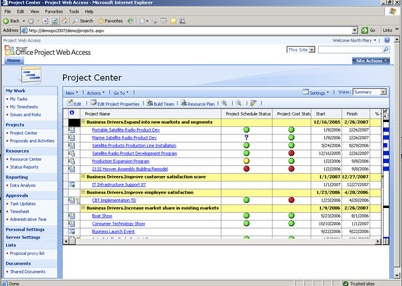
- Visibility into Projects and Sub-Projects ... In the world of David Allen's Getting Things Done, projects and next actions are managed and tracked at the individual level, and any multi-person coordination happens through meetings or email updates (eg, "how's that item coming along that I asked you to look into?"). In a world of more complexity, where project managers are intentional about planning out phases and activities and allocating specific people or resources to each, and where people are involved in multiple projects at once, and where some projects are dependent on other projects being completed, and where other projects are sub-projects of a bigger project or program of work, there needs to be some way of making sense of it all. Project Server consolidates a set of project plans into an overall view, so as to provide high-level visibility into the allocation of people / resources, and to highlight the dependencies between projects, phases and activities. From a business perspective, such insight is invaluable in knowing whether go-to-market timelines are going to be met, whether certain people are overloaded, and where staffing levels are inadequate.
And finally, for organizations that have a Project Management Office (PMO) and a complex array of projects, Microsoft now offers Project Portfolio Server 2007 for managing a portfolio of projects. If project managers use the Project client to lay out a project, and Project Server to share that information with others, then Portfolio Server is in theory a good step up for strategically managing a portfolio of projects at the organizational level. Securing an all-of-business project management solution from one vendor is a compelling value proposition.
And You?
What would you add to the above list? What would you remove? How would you describe the business value of Project Server?
Hi Michael,
I would like to add some comments on your vision on the Business Value of Project Server 2007 compared to Project 2007. I agree with you about the 3 points of value, but I think every Organization has it's own 3 points of value depending on type of organizaton, projectmanagement maturity level, sense of urgency to professionalize projectmanagement etc.
First I would like to clarify Project Server a bit. I prefer to talk about the Microsoft EPM Solution instead of Project Server.
EPM is our enterprise projectmanagement solution that consists of:
- Project Professional (Microsoft Project)
- Project Server and WebAccess
- Project Portfolio Server and WebAccess.
The EPM Solution includes Project Professional!
Microsoft Project is designed to be used by projectmanagers to manage an individual project (or multiproject) or a limited number of projects. It is not designed to be a solution for enterprise projectmanagement. That's why a Customer needs the Microsoft EPM Solution. Typical pm business needs are:
- Align work with strategic objectives
- Algin resources and business strategy
- Manage projects and resources effectively
- Gain visibility and control over projects
These business needs can be met by EPM. The Microsoft EPM solution intelligently manages the intire investment and project lifecycle- from strategic portfolio decisions to managing work. EPM is the next logical step on top of Microsoft Project usage.
The key capabilities of EPM are:
- Work Management
- Resource Management
- Portfolio Optimization
- Team Collaboration
Below a list of the key business benefits per capability. Please read all of these benefits from an enterprise perspective (!!!) instead of from the perspective of one individual project.
Key benefits Work Management:
- Provides Organizational visibility
- Automate processes for managing scope, risk, quality, issues and schedules
- Capture, align, select, and prioritize all project work with enterprise objectives
- Track the entire project life cycle
- Offers a single view of all projects and programs
- Rich, dynamic reporting capabilities (real time reports instead of outdated spreadsheets.....)
Key benefits Resource Management:
- Allocate resources based on skills and availability
- Manage material resources
- Track timesheets
- Track costs and budget to better understand finances
- Create transparant schedules
- Analyze and manage finances, resources, schedules, and materials across projects
Key benefits Portfolio Optimization:
- Prioritize business strategy and competing investments
- Align selected portfolios with business strategy
- Measure and track portfolio performance
- Determine optimal portfolio under budget and business constraints
- Quickly realize a return on investment
And last but not least:
Key benefits Team Collaboration:
- Collaborate via project and program workspaces
- Access Project information online
- Manage team documents with rich metadata, workflow, search, check-in and check-out, and document versioning
- Share documents, synchronize calendars, stay up to date with team events, and assign tasks.
I hope this clarifies the enormous business value of EPM a bit :-)
Implementing EPM requires a bit more effort than implementing Microsoft Project (we advise to use one of our EPM-implementation partners). But in most cases the business case is easy, because the Microsoft EPM Solution leverages on Microsoft Project usage. For most Project stakeholders, EPM is more user-friendly than Microsoft Project; EPM is role based; project team members, resource managers, controllers and managers don't need MS Project, but can work in a Webbased Project Server environment.
Regards,
Arthur Paanakker
EPM Partner Account Manager
(Microsoft the Netherlands)
Posted by: Arthur Paanakker (Microsoft the Netherlands) | May 30, 2007 at 02:44 AM
Wow, Arthur, thanks for visiting and adding some ideas. Very helpful. Yes, I agree that drivers are very much context-dependent, and I do get the "EPM Solution" piece ... I guess in the view of the person I was speaking to, they were asking "what's the value of the server-side components of 'project'?" ... hence my focus. Your points are well taken.
M.
Posted by: Michael Sampson | May 31, 2007 at 04:57 PM
Michael,
Thanks for an interesting post! It's relevant to some of the thinking I'm doing right now. I'm about to start a client project where I will be helping to set up a project blog to support collaboration and information sharing. In connection with that I just initiated an independent survey of project managers who have experience using a blog as a project management tool.
What caught my eye about your post is the thread of “collaboration” and “information sharing” that runs through your description of how Project Server provides value. While I would never attempt to manage and administer a large or complex project without a tool such as Project, I think it may also be worth considering whether the types of sharing provided by Project Server are necessarily sufficient.
Sharing “traditional” types of project data -- task status, resource usage and projections, milestone & progress information, etc. – is important, but there may only be a subset of individuals for whom such details are relevant. For others, more general or unstructured discussions of project activities and assets might be more important.
I believe this is one of the reasons why MS Project is so often discussed in connection with Sharepoint, which now provides a variety of collaborative features including tagging, feed subscriptions, and other “web 2.0” features. Project management requires the use of many different tools, some optimized for highly structured processes (such as MS Project) as well as others optimized for more free-wheeling or unstructured collaboration (such as the typical blog).
Again, I can’t imagine running a project without a mix of such tools; this is one of the reasons I’m looking for project managers to interview who have experience using blogs as a project management tool: http://www.ddmcd.com/project_blog_01.html . If you are interested in participating in this survey, please let me know!
Dennis D. McDonald
Alexandria, Virginia
http://www.ddmcd.com
Posted by: Dennis D. McDonald | May 31, 2007 at 08:44 PM
Dennis, thanks for your comments. I don't disagree about the "unstructured" support for projects ... that's been a big focus of mine for a long time. It is good to call out the differences.
M.
Posted by: Michael Sampson | June 07, 2007 at 06:45 AM
Hi Michael,
Thx for this very useful information forum on MS Project Server (and EPS). I am currently working in Sweden as a consultant Programme Manager for a (new) but major EU agency and we are implementing a Programme Office and project portfolio management. I am considering a number of options including solutions such as @TASK to help the organisation manage its projects more effectvely.
I am also considering MS Project, Server, Portfolio and Web but am absolutely lost with MS licencing and costing. From a business perspective I agree that the MS EPM soluton appears OK but unless they get to grips with putting together a package that eveyone understands I feel that they will lose business to more coordinated solutions such as @TACK.
Anyhow we keep going don't we!
Regards
Chris G Tinker
Consulting Director
Magic Enterpirses. Biz Ltd
Posted by: Chris Tinker, Stockholm | February 02, 2008 at 12:16 AM