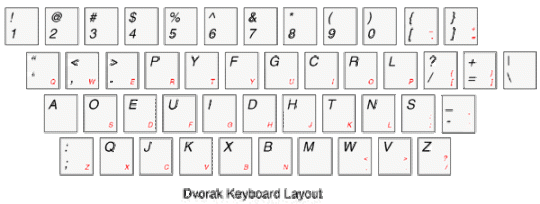
Five weeks ago I turned my back on 17 years of touch typing on a QWERTY keyboard, and switched to the Dvorak keyboard. Not only could I touch type, but I could do so very quickly and mindlessly. That is, I could look at someone in an interview and touch type what they were saying. The cognitive effort was nearly nil to do so, as my computer was an extension of my body through years of practice and ingrained habits. The QWERTY keyboard wasn’t an artifact separate from me; it was part of me.
And, wow, did it hurt to shift away. Apart from two keys (A and M), every other key on the Dvorak keyboard is in a different place than the QWERTY one. Over the past five weeks I have had to re-learn how to spell.
On the History of QWERTY
The story I heard (and have repeated to others) regarding the QWERTY keyboard is that it was designed in the 1860s to slow typists down. Keyboards prior to QWERTY were alphabetical, and due to the use of mechanical typewriters with one letter per prong, a fast typist would cause the typewriter to jam. Hence QWERTY was designed and introduced to counteract this. And it worked. But whether you can definitively say that QWERTY was designed to SLOW DOWN the typist or to REDUCE THE INCIDENCE OF JAMMING is unclear. Those underlying motivations are not the same, and I think that it doesn’t really matter.
Read more at Wikipedia.
On Why You Might Change
Some of the reasons for changing that I heard were:
1. A QWERTY typist moves their fingers 16 miles in a day of typing, compared to 1 mile for a Dvorak typist.
2. More letters of words are on the home keys on Dvorak than QWERTY, eg, 72% of letters in words vs. 30% or so.
3. Reduced likelihood of RSI
4. The ability to type faster … perhaps up to twice as fast.
On BlackBerry and its QWERTY Keyboard
When I changed across to Dvorak on my computer, I naturally assumed that I would also want a Dvorak keyboard on my BlackBerry. After 5 weeks, I think that is a fallacy, and that there is no problem maintaining a disparate approach. Here’s why: on a computer keybaord, you use your fingers to type and thumbs for the space bar, but on the BlackBeery you use your thumbs to type and for the space bar. Therefore the ingrained patterns of typing on the one via fingers do not at all interfere with the ingrained patterns of typing on the other via thumbs. They can absolutely proceed apace side-by-side, without interfering with the other.
Was It Worth It?
It’s too early to tell for me whether the transition was worth it. I need another month yet before the expected benefits could / might kick in. The act of typing has shifted, most definitely, for me from an invisible part of my work to a very front-brained activity. In the first week I was much more tired at the end of a work day, due to the additional cognitive load of trying to remember where the keys were, and as a consequence what finger to fire and whether it had to be moved or not before firing.
If the above benefits are actually realizable, then this two month experiment will pay off in truck loads over the next 30-40 years. If not, well, at least this old boy proved that he can still learn something new.
(And, it has been just as well that I haven’t gone to any conferences with Eric. He can now type faster than me … ouch!!)
Categories: Michael's Happenings

